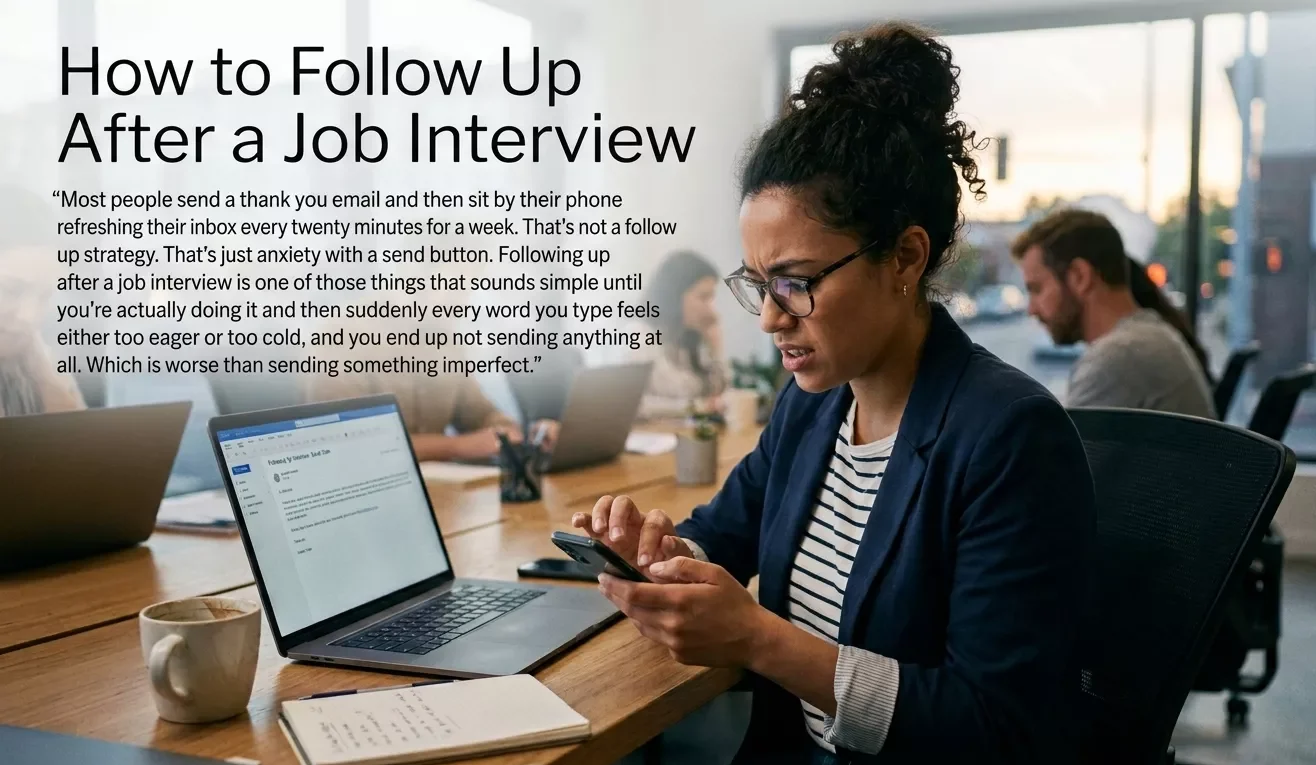
Most people send a thank you email and then sit by their phone refreshing their inbox every twenty minutes for a week. That’s not a follow up strategy. That’s just anxiety with a send button. Following up after a job interview is one of those things that sounds simple until you’re actually doing it and then suddenly every word you type feels either too eager or too cold, and you end up not sending anything at all. Which is worse than sending something imperfect. Lets learn How to Follow Up After a Job Interview? So here’s how to actually do it. What to send, when to send it, what to say when you still haven’t heard back two weeks later, and what not to do if you want to keep the door open. The Thank You Email Nobody Actually Sends Within 24 Hours Within 24 hours of your interview. That’s the window. Not three days later. Not the next week when you “get around to it.” The same day if you can, the next morning at the latest. Most candidates don’t do this. Which means doing it puts you ahead of the majority of people who interviewed for the same role — before you’ve done anything else. The email doesn’t need to be long. It really doesn’t. Three to four short paragraphs is all you need: First paragraph — thank them for the time. Specific is better than generic. “Thank you for taking the time to speak with me yesterday about the content manager role” beats “thank you for the opportunity” every single time. It shows you were present in the conversation, not just going through the motions. Second paragraph — reference something specific from the interview. One real thing you discussed. A project they mentioned, a challenge the team is working through, something that stood out in the conversation. This is the part that separates a real thank you email from a template someone copied off a careers website. Anyone can say they’re excited about the role. Not everyone can reference the specific thing the hiring manager said about their Q3 product launch and connect it back to something they bring to the table. Third paragraph — reaffirm your interest. Keep it short. One sentence saying you’re looking forward to next steps is enough. Don’t oversell. Don’t list your qualifications again. They already have your resume. Close — something simple. “Please don’t hesitate to reach out if you need anything else from me.” Then your name and contact info. That’s it. The whole email should be readable in under a minute. If it takes longer than that, cut something. What “Something Specific From the Interview” Actually Looks Like This trips people up so it’s worth spelling out with a real example. Generic version: “I really enjoyed learning more about the company culture and I’m excited about the opportunity to contribute to your team.” That could have been written by anyone who interviewed anywhere for anything. It tells the hiring manager nothing. Specific version: “The challenge you mentioned around scaling the content operation without losing the brand voice is something I’ve navigated directly and I’d love to bring that experience to how your team approaches it over the next year.” That’s a sentence that could only have been written by someone who was actually in that conversation. It shows you listened. It connects your experience to their actual problem. And it gives the hiring manager something concrete to remember about you when they’re comparing candidates. You don’t need to write a masterpiece. You just need one specific detail that proves you were paying attention. This matters especially if you’re going for a technical or design role, someone interviewing for a position where they need to show problem-solving instincts, like a candidate who’s read up on what a UI UX designer actually does on the job, knows that referencing a specific design challenge from the interview lands better than generic enthusiasm. You Haven’t Heard Back — When Do You Follow Up Again? This is where most people either go quiet completely or send three emails in five days and wonder why the recruiter stopped responding. The answer depends on what timeline they gave you at the end of the interview. If they gave you a timeline: wait until that date passes, then follow up one business day after. If they said “we’ll be in touch by end of next week” and end of next week comes and goes send a short note the following Monday or Tuesday. Not the same day the deadline passes. Give it one extra day. If they gave you no timeline: wait one week after your thank you email before following up again. One week is professional. Three days reads as impatient. Two weeks reads as disinterested. The follow up email in this case is even shorter than the thank you note. Something like: “Hi [Name], I wanted to follow up on my interview from [date] for the [role] position. I remain very interested in the opportunity and wanted to check if there are any updates on the timeline or next steps. Happy to provide any additional information if that would be helpful.” That’s it. Short, direct, no desperation in the language. You’re not begging. You’re just checking in like a professional who’s interested in the role. And while you wait — use that time well. If you’re still early in your career and figuring out which direction to go, it’s worth exploring how to become a UI UX designer with no experience or looking at which industries are hiring aggressively right now. Still Nothing After Two Emails — Do You Send a Third? Yes. Once. And then you stop. Two weeks after your second follow up with no response send a final short note. Keep it even shorter than the last one. Something like: “Hi [Name], I know you’re likely managing a busy hiring process. I wanted to reach out one more time to express
How to Check WordPress Cron Jobs?
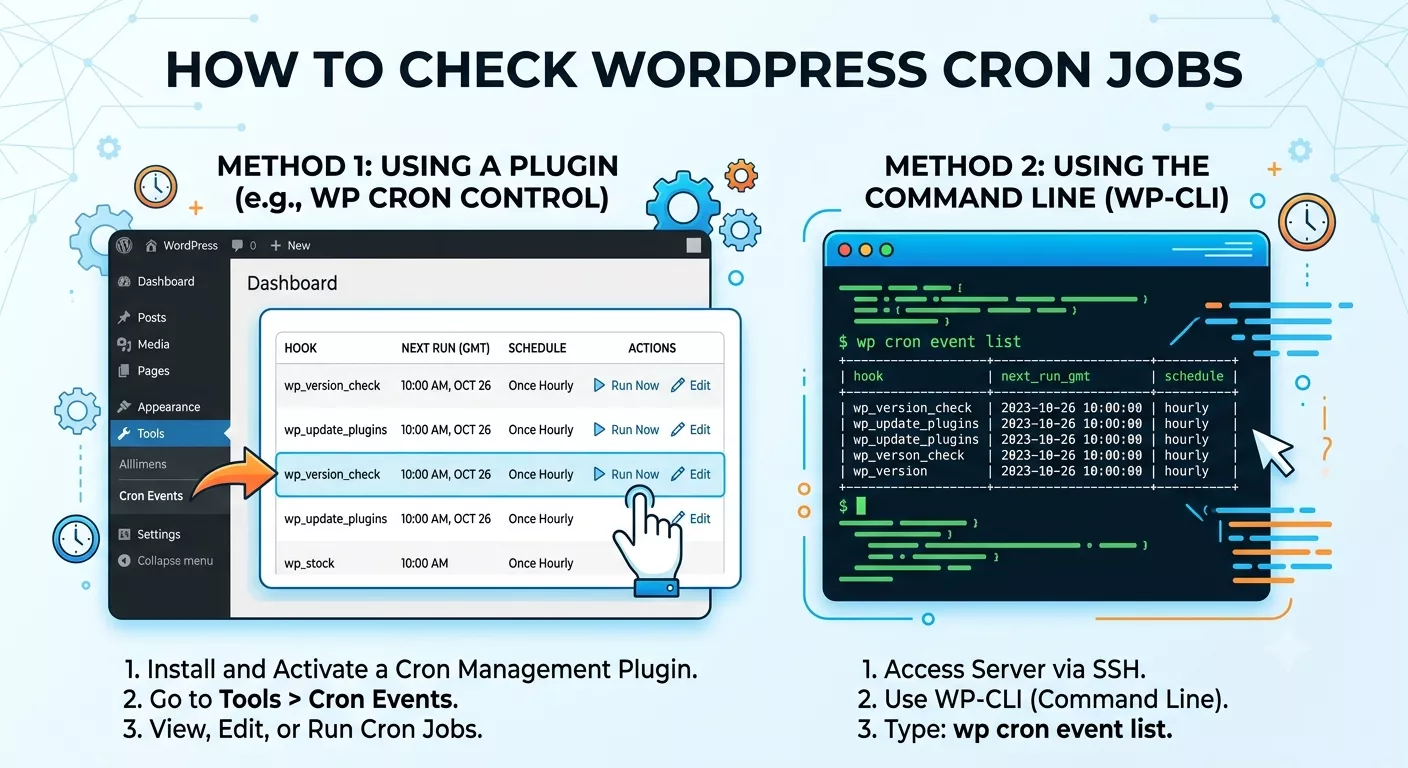
Many WordPress websites perform tasks automatically without the site owner doing anything manually. Things like publishing scheduled content, sending notifications, clearing temporary data, and updating certain records happen in the background through WordPress cron jobs. If you manage a website and notice delays in scheduled posts or missed automated tasks, checking these background processes becomes important. While learning about website management, many people also explore career paths such as Remote IT Jobs, where understanding automation systems can be surprisingly useful. WordPress uses a built-in scheduling system known as WP-Cron. Unlike a traditional server cron, WP-Cron depends on website visits to trigger scheduled tasks. This setup works well for many sites, but it can sometimes cause delays, especially on websites with low traffic. How to Check WordPress Cron Jobs The first step in learning How to Check WordPress Cron Jobs is understanding where these tasks are stored and how they are triggered. WP-Cron keeps a list of scheduled events inside the WordPress database. These events include plugin tasks, maintenance routines, scheduled posts, backups, and various automation functions. When a visitor opens a page, WordPress checks whether any scheduled tasks are due. If an event needs to run, WP-Cron executes it. Checking these events helps identify failed tasks, plugin issues, and performance problems before they become larger concerns. Why Website Owners Check WP-Cron Events There are many situations where checking WP-Cron becomes necessary. A scheduled article may fail to publish. A backup plugin may stop running. Emails may not send on time. Sometimes these issues are caused by plugin conflicts, server limitations, or configuration errors. Website administrators often face these situations while managing larger projects. Learning technical concepts is similar to exploring topics like can i learn UX without UI. At first, it seems complicated, but once the fundamentals are understood, troubleshooting becomes much easier. WordPress cron jobs provide visibility into what the website is trying to accomplish automatically. When those tasks stop working, checking the cron queue is usually one of the first diagnostic steps. Common Types of WordPress Cron Jobs WordPress schedules many different background activities. Cron Event Type Purpose Scheduled Posts Publishes content automatically Plugin Updates Checks update availability Database Cleanup Removes temporary records Backup Tasks Creates backups automatically Email Notifications Sends reminders and alerts Security Scans Checks website vulnerabilities Cache Cleanup Clears outdated cached files These scheduled tasks help maintain website automation and reduce manual workload. Using WP Crontrol to View Scheduled Events One of the easiest ways to check WordPress cron jobs is through the WP Crontrol plugin. Many developers use this plugin because it displays all cron events directly inside the WordPress admin dashboard. After installing WP Crontrol, a new section becomes available under Tools. Here you can view upcoming events, execution times, recurrence schedules, and hook names associated with WordPress plugins. The plugin allows website owners to: WP Crontrol is often considered one of the most useful WordPress debugging tools available for administrators. Looking at Scheduled Tasks Through the Dashboard Not every website owner wants to inspect code or access databases. Fortunately, WP Crontrol makes the process visual and straightforward. If a plugin creates recurring tasks, those events will appear in the schedule list. This makes it easier to identify whether plugin conflicts or missed schedules are affecting the site. Many beginners who start working with websites often transition into broader technical roles. Topics like ui ux designer with no experience frequently attract people who later develop an interest in website management and automation systems. A quick dashboard review can reveal hundreds of scheduled tasks operating behind the scenes. Understanding How WP-Cron Differs From Server Cron One source of confusion comes from the difference between WP-Cron and traditional server cron jobs. Feature WP-Cron Server Cron Trigger Method Website Visit Server Schedule Accuracy Moderate High Traffic Dependent Yes No Performance Impact Possible Lower Reliability Good Better A server cron runs according to a strict timetable. WP-Cron relies on user visits. This distinction explains why scheduled posts sometimes fail on low-traffic websites. Many experienced administrators disable WP-Cron and replace it with a real server cron for greater reliability. Finding Missed Scheduled Posts One of the most common reasons people investigate WordPress cron jobs is a missed scheduled post. If a post remains unpublished despite being scheduled, several issues could be responsible: Learning how cron events function helps identify the underlying cause. In website administration, understanding background systems is similar to using tools such as an how much ui ux salary on average calculator. The visible result is simple, but a lot happens behind the scenes to generate accurate information. Checking cron events often reveals whether the publication task was triggered at all. How to Check Cron Jobs Without Plugins Advanced users sometimes prefer checking scheduled events manually. Several methods exist: WP-CLI offers commands such as: wp cron event list This command displays all active cron events directly from the command line. Developers working on large websites often use this method because it provides quick access without opening the dashboard. Monitoring WordPress Error Logs Error logs provide another useful source of information. When cron jobs fail repeatedly, error messages may appear inside: WordPress error logs can reveal memory limitations, timeout issues, and execution failures. Combining log analysis with cron event inspection creates a much clearer picture of overall WordPress performance. When Plugin Conflicts Cause Cron Problems Many websites run dozens of WordPress plugins simultaneously. Each plugin may create its own scheduled tasks. This increases the possibility of plugin conflicts. For example: Troubleshooting becomes easier once administrators can identify which plugin created the affected cron event. People researching career paths such as ui ux designer jobs often discover that technical troubleshooting skills are valuable across many digital professions, including WordPress administration. Understanding plugin behavior helps reduce recurring website automation problems. Improving Website Automation Through Cron Management Effective cron management supports website automation in several ways. Regular monitoring helps: Automation becomes increasingly important as websites grow larger. A small blog might have only a few scheduled tasks. A large
Best LinkedIn Tips to get Remote Tech Jobs?
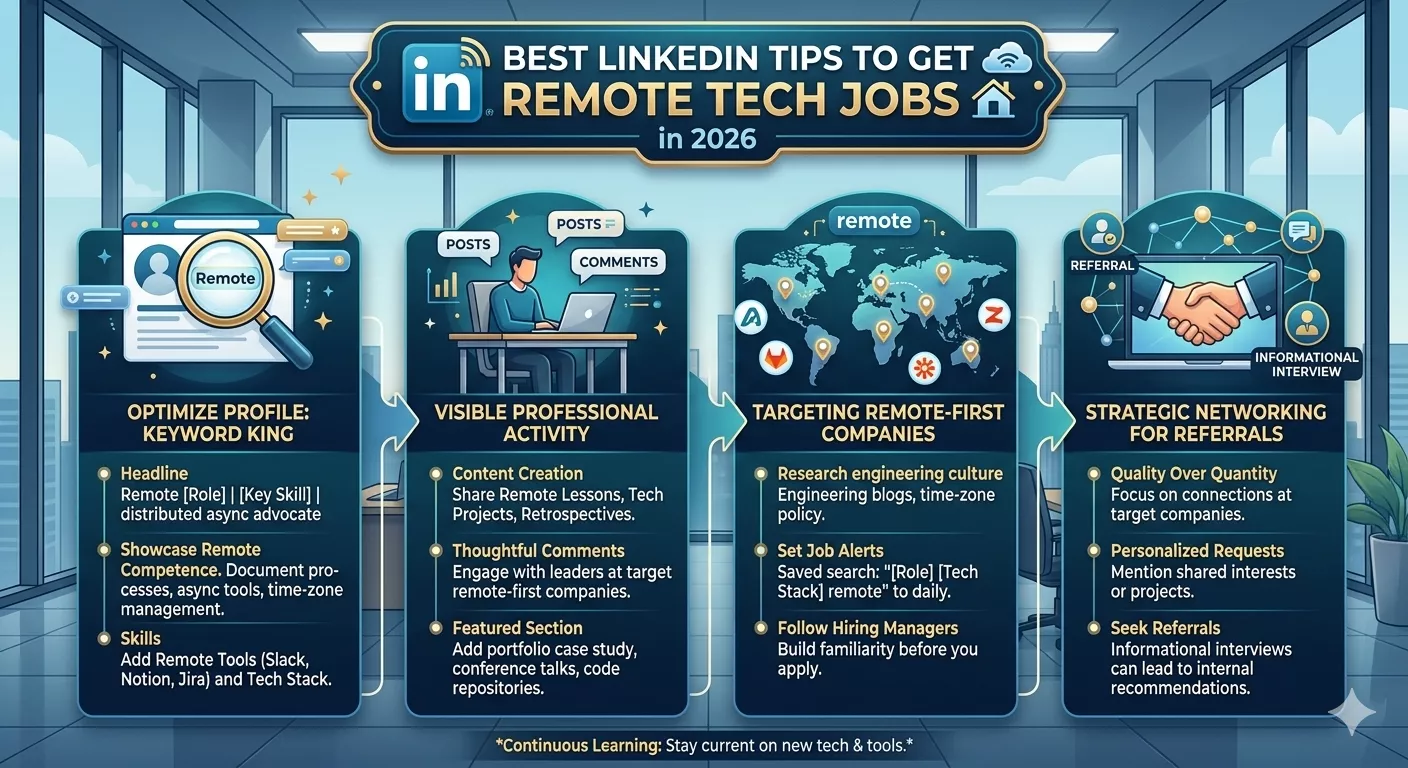
Remote hiring changed the way people build careers in tech. A few years ago, many developers, designers, and IT support workers mostly searched inside their own cities. Now companies hire across countries and time zones, and that made competition tougher too. A polished LinkedIn profile matters more than people expect. Recruiters often check LinkedIn before they even open a resume. Someone looking for Remote IT Jobs can miss opportunities simply because their profile looks inactive or incomplete. The good part is that small profile changes sometimes bring noticeable results faster than endlessly applying to listings. LinkedIn tips to get remote tech jobs that actually help A lot of advice online sounds repetitive. “Be active.” “Network more.” “Post consistently.” That is not wrong, but it skips the practical side. People searching for remote tech jobs usually want to know what recruiters really notice and what pushes profiles down in search results. The first thing is profile clarity. Recruiters scanning hundreds of candidates do not spend several minutes decoding vague job titles. A headline like “Passionate Tech Enthusiast” tells them almost nothing. A better version is specific: Clear positioning helps LinkedIn optimization because the platform indexes those keywords. It also helps the LinkedIn algorithm connect profiles with recruiter searches. Another thing people ignore is activity history. A completely silent profile looks abandoned. You do not need daily motivational posts. Even short comments about projects, bug fixes, remote work setups, or software updates make your account appear active. Why LinkedIn matters more for remote work Companies hiring for remote work often receive applications from many countries. That means recruiters use filters heavily. They search by skills, certifications, previous companies, remote experience, and sometimes even communication style visible through posts. This is why LinkedIn networking matters more in remote hiring compared to traditional office hiring. Employers cannot physically meet applicants early in the process, so profiles become the first impression. A strong LinkedIn profile also helps with passive hiring. Sometimes recruiters contact people who never applied. This happens often in software developer jobs, cloud engineering roles, cybersecurity positions, and product-focused tech careers. Many beginners ask whether they should study UX before UI design while building a tech profile. Discussions around can i learn UX without UI appear often in remote communities because recruiters sometimes search both skills together. Having at least basic understanding of user flows and design thinking helps even developers communicate better with teams. Your headline decides whether recruiters click People spend hours writing summaries but ignore the headline section. The headline is usually the first visible line in search results. Weak headline example: Better headline example: That second version instantly explains the candidate’s direction. For remote tech jobs, include: A recruiter searching “React remote developer” is far more likely to find optimized profiles than generic ones. The About section should sound human This section often becomes robotic because people try too hard to sound professional. Recruiters read enough corporate language every day. A simple, direct tone usually works better. Instead of:“Results-driven professional with proven expertise in scalable solutions…” Try:“I build web applications mainly with React and Node.js. Most of my recent work involved SaaS dashboards and API integrations. I enjoy remote teams because communication stays documented and organized.” That feels more natural. Good LinkedIn optimization is not about stuffing keywords awkwardly. Mention remote tech jobs naturally alongside experience, tools, and achievements. Remote recruiters check consistency One strange thing recruiters notice quickly is inconsistency between resumes and LinkedIn profiles. Dates mismatch. Skills appear in one place but not the other. Project details change. That creates hesitation. Your LinkedIn profile, resume optimization strategy, and portfolio should support each other instead of looking disconnected. A simple structure works best: Section What Recruiters Want Headline Clear role and skills About Human summary with specialization Experience Measurable contributions Skills Relevant technical stack Activity Signs of engagement Portfolio Real work examples For remote work hiring, communication consistency matters because companies already worry about managing distributed teams. Skills sections still affect search visibility Some people think skills sections are outdated. They still matter because LinkedIn search filters rely heavily on them. Important skills for remote tech jobs may include: Profiles with complete skill sections often appear higher in recruiter searches. This also helps entry-level people. Someone applying as a ui ux designer with no experience can still improve visibility by adding accurate design tools, coursework, and portfolio skills rather than leaving sections empty. Recommendations quietly build trust Recommendations are underrated. One detailed recommendation from a manager or client sometimes matters more than dozens of endorsements. Remote employers especially value comments about: Those traits matter in remote work environments where supervision is limited. Ask former coworkers for short, honest recommendations. Avoid scripted paragraphs that sound fake. Posting content helps more than most people think You do not need influencer-style content. Recruiters simply want proof that you understand your field. Examples: This supports professional networking naturally without forcing constant self-promotion. Content activity also improves visibility through the LinkedIn algorithm. Active users appear more frequently in searches and feeds. Networking works differently online Traditional networking often meant events and business cards. LinkedIn networking feels slower but scales better. A useful approach: Cold messaging without context usually fails. Good recruiter outreach is short and respectful:“Hi, I saw your post about remote backend openings. My recent work focused on Node.js APIs and cloud deployment. I’d love to connect.” Simple works. Remote employers care about communication signals Hiring managers often assume technical skills can improve over time. Communication problems are harder to fix. Your LinkedIn activity quietly reveals communication habits. Signs recruiters notice: That matters for remote tech jobs because written communication becomes part of daily work. Many professionals researching salary growth also search terms like how much ui ux salary on average because remote hiring changed compensation expectations across regions and industries. Portfolio links matter more than certificates Certificates help, but portfolios create stronger impressions. Developers should show: Designers should show: Cybersecurity professionals can showcase: A LinkedIn profile connected to real work
What is the Job of a UI UX Designer?
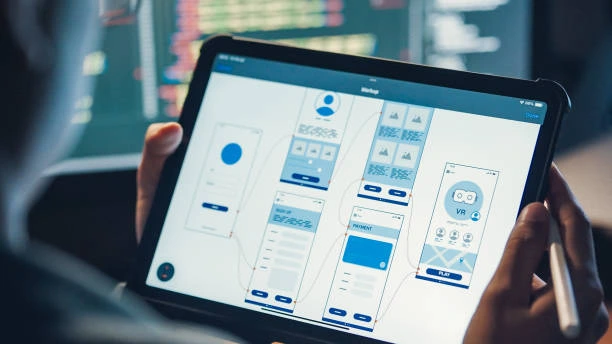
People outside tech often think UI UX design is just making apps look pretty. That idea sticks around because most users only notice colors, buttons, and layouts. The actual work goes deeper than that. A designer spends a lot of time understanding how people behave, where they get confused, and what makes a product feel easy instead of frustrating. You’ll even notice many people searching for Remote IT Jobs end up exploring UI UX design because it mixes creativity with practical problem-solving in a way that feels less rigid than traditional development work. Understanding what is the job of a ui ux designer When someone asks what is the job of a ui ux designer, they’re usually trying to understand the difference between user interface design and user experience design. The two are connected, but they are not identical. UX design focuses on how a product works and feels. UI design focuses on how the product looks and interacts visually. A UI UX designer handles both sides in many companies. They study users, sketch layouts, build wireframes, test ideas, and improve interfaces based on feedback. Some days are creative. Some are analytical. A surprising amount of time goes into fixing small usability issues people barely notice consciously. The difference between UI and UX work A lot of beginners mix these terms together. Here’s a simple comparison: Area Main Focus UX Design User experience, flow, usability UI Design Visual layout, buttons, colors Combined UI UX Both usability and appearance UX design careers often involve research and testing. UI design jobs lean more toward visual presentation. In smaller companies, one designer may handle everything. Daily tasks a UI UX designer usually handles The work changes depending on the company, but most UI UX jobs include a mix of these responsibilities: Task Purpose Wireframing Planning layouts User Research Understanding user behavior Prototyping Testing design ideas UI Design Creating visual interfaces Usability Testing Finding user frustrations Team Collaboration Working with developers Some days involve meetings for hours. Other days are quiet design sessions with headphones on. A lot of people wondering can i learn UX without UI eventually realize the fields overlap constantly, even when companies separate the roles. Why businesses hire UI UX designers Companies care about user experience because confusing products lose users quickly. If an app feels awkward, people leave. They may not even know why. They just stop using it. UI UX designer jobs exist because businesses want smoother digital products. Better design can improve customer retention, reduce support issues, and increase engagement. Even simple changes matter. A badly placed button can frustrate thousands of users daily. User research is a bigger part of the job than people expect New designers often expect nonstop visual creativity. In reality, research matters just as much. A UI UX designer may interview users, review analytics, or watch people interact with prototypes. The goal is to identify friction points. Questions designers ask include: This research shapes design decisions. The role of wireframes and prototypes Tools UI UX designers use regularly Most UI UX designers rely on industry-standard tools. Tool Main Use Figma UI design and prototyping Adobe XD Interface design Sketch UI layouts Miro Collaboration and brainstorming Photoshop Image editing Figma dominates many UX design careers today because teams can collaborate in real time. How UI UX Designers Work with Developers? Designers don’t build everything themselves. Developers handle coding, but communication between teams matters constantly. Designers explain spacing, animations, interactions, and layouts. Developers then translate those ideas into working products. Miscommunication happens more than people think. A small design detail may behave differently once coded. Remote work and flexibility in UX design Many UI UX designer jobs now support remote work. Since most tasks happen digitally, designers can collaborate from almost anywhere. Remote design work usually involves: This flexibility attracts people interested in digital design careers without traditional office structures. How much creativity does the job really involve? There’s creativity, but not in the way many beginners imagine. Good UI UX design solves problems first. Visual creativity supports usability, not the other way around. A beautiful app that frustrates users still fails. That balance between creativity and logic defines most user experience jobs. Salary expectations in UI UX design UI UX salaries vary heavily based on location, experience, and specialization. Experience Level Average Range Beginner $45,000–$70,000 Mid-Level $70,000–$110,000 Senior $110,000+ A lot of people search how much ui ux salary on average because the field has grown rapidly over the last several years. Still, salary alone doesn’t explain the work. Deadlines and revisions can become exhausting in fast-moving companies. What skills matter most in UX design Careers? Technical skill matters, but communication matters just as much. Strong UI UX designers usually develop: The best designers often notice frustrations other people ignore completely. How beginners enter UI UX design? Many people enter through self-learning instead of formal degrees. Some start with graphic design. Others transition from development, marketing, or even psychology. A beginner portfolio often matters more than certifications. People exploring ui ux designer jobs usually spend months building practice projects before applying professionally. Common industries hiring UI UX designers: UI UX work exists far beyond tech startups. Industries hiring designers include: Industry Design Need Healthcare Patient apps Finance Banking interfaces Education Learning platforms E-commerce Shopping experiences Gaming Interactive design SaaS Product usability Almost every digital product now depends on user experience design in some way. The pressure behind the work People sometimes romanticize design careers online. The work can become repetitive. Revisions happen constantly. Stakeholders change decisions midway through projects. User testing may completely invalidate days of work. A designer might spend hours adjusting tiny interface details users barely notice consciously. That’s normal. How UI UX design differs from graphic design? Freelance vs full-time design work Do UI UX designers need coding skills? Not always. Basic HTML and CSS knowledge helps communication with developers, but many UI UX designers never become strong programmers. The main goal is understanding how interfaces behave, not building

What is remote bookkeeping jobs like?
When people first hear about bookkeeping jobs from home, it sounds simple. Numbers, spreadsheets, maybe a few invoices here and there. The reality is a bit more layered than that. Remote bookkeeping jobs sit somewhere between routine work and problem-solving. Some days feel repetitive, other days require you to dig through records to understand what went wrong. A lot of people exploring Remote IT Jobs end up crossing paths with virtual bookkeeping because both involve working independently, managing digital tools, and staying organized without someone looking over your shoulder. The difference is bookkeeping leans more toward financial accuracy than technical systems. What is remote bookkeeping jobs like At its core, the work revolves around tracking money. Not in a vague way, but in a very structured one. You’re recording transactions, categorizing expenses, reconciling bank statements, and making sure everything lines up. Remote bookkeeping jobs don’t really change the nature of the work itself. They change the environment. Instead of sitting in an office, you’re working from home, sometimes alone, sometimes communicating with clients through messages or calls. For beginners, what is remote bookkeeping jobs like for beginners and freelancers often comes down to consistency. The tasks repeat, but the data changes. That repetition is what builds accuracy over time. A typical day working from home as a bookkeeper There’s no single routine that fits everyone, but most days follow a pattern. You log in, check client accounts, review new transactions, and start organizing them. Some entries are straightforward. Others require checking invoices or receipts. You might spend time matching bank transactions to recorded entries. That’s called reconciliation, and it’s a big part of remote bookkeeping jobs. For people switching careers, it can feel similar to learning something new, like asking can i learn UX without UI, where the structure is clear but the details take time to understand. The pace depends on workload. Some days are quiet, especially in part time bookkeeping jobs. Others can feel packed, especially near financial deadlines. Tools and software used in virtual bookkeeping Everything happens through software. You rarely deal with paper anymore. Common tools include accounting platforms, spreadsheets, and cloud storage. These tools handle transaction tracking, reporting, and communication with clients. Here’s a simple table to show the common setup: Tool Type Purpose Example Use Accounting Software Record transactions Logging income and expenses Spreadsheet Tools Data analysis Reviewing financial summaries Cloud Storage File sharing Uploading receipts and invoices Communication Apps Client interaction Clarifying transaction details Virtual bookkeeping relies heavily on these systems. Without them, bookkeeping jobs from home wouldn’t really function. Skills needed to handle online bookkeeping jobs You don’t need advanced math, but you do need accuracy. Small mistakes can create bigger issues later. Attention to detail matters more than speed. Being organized helps too, especially when managing multiple clients. Understanding basic accounting principles is important. You don’t have to be an expert at first, but you need to know how money flows through a business. There’s also a communication side. Clients might ask questions about their finances. You need to explain things clearly without overcomplicating them. How remote bookkeeping differs from office work The biggest difference is independence. In an office, you can ask someone nearby for help. At home, you rely more on your own understanding or online resources. Work from home accounting also requires discipline. No one is watching your schedule. You decide when to work, which sounds easy until distractions show up. Another difference is communication style. Most conversations happen through messages or scheduled calls, not quick desk chats. Freelance vs employed remote bookkeeping jobs Some people work as employees for companies. Others choose the freelance bookkeeper path. Freelancers handle multiple clients. That means more flexibility, but also more responsibility. You manage your own workload, deadlines, and sometimes even pricing. Employed bookkeepers usually have stable hours and consistent tasks. Less flexibility, but more predictability. Both paths exist within accounting remote jobs, and the experience can feel quite different depending on which one you choose. Entry level opportunities and getting started Entry level bookkeeping jobs are available, but they expect basic knowledge. Not expert-level, just enough to understand transactions and records. Learning can happen through courses or practice. Some people start by helping small businesses or handling simple bookkeeping services. It’s similar to other fields where beginners look for direction, like ui ux designer with no experience, where starting small builds confidence. Once you gain experience, better opportunities open up. Pros and cons of working as a remote bookkeeper There’s a balance here. Not everything is perfect, but not everything is difficult either. Pros Cons Flexible schedule Can feel repetitive Work from anywhere Requires self-discipline Growing demand Client communication challenges Independent work Less social interaction Some people enjoy the routine. Others find it a bit monotonous. It depends on personality more than anything else. Income and salary expectations Income varies a lot. Beginners earn less, experienced bookkeepers earn more. Freelancers can scale income depending on how many clients they manage. Part time bookkeeping jobs usually pay less overall but still provide steady income. Full-time roles offer more stability. People often compare different fields, asking things like how much ui ux salary on average, but bookkeeping follows a different pattern. It grows slowly with experience rather than jumping quickly. Where to find remote bookkeeping jobs? Jobs are spread across different platforms. Some are listed on freelance websites, others on job boards. Online bookkeeping jobs appear in both categories. Some companies hire directly, others look for contractors. Networking also helps. Many freelance bookkeepers get clients through referrals rather than job listings. Challenges people don’t expect at first The quiet can be surprising. Working alone all day isn’t for everyone. There’s also the responsibility. If numbers don’t match, you have to figure out why. No one else will fix it for you. Time management becomes important too. Without structure, work can stretch longer than expected. How this career connects with other remote roles Remote bookkeeping jobs share similarities with other remote careers.

How Much Does SEO Cost? Complete Guide
When people first look into SEO, the numbers feel all over the place. One agency quotes a few hundred dollars, another throws out a figure that sounds like a full-time salary. That gap confuses almost everyone at the start. The thing is, SEO isn’t a fixed product, so the price rarely stays consistent. It depends on goals, competition, and how much work is actually needed. You might see businesses compare it to other services or even job markets like Remote IT Jobs, just to make sense of how pricing varies depending on skill and demand. How Much Does SEO Cost? If you’re asking How Much Does SEO Cost?, the honest answer is: it varies more than most services. Some small projects sit around $200 to $500 per month, while larger campaigns can cross $5,000 or even higher. The range looks wide because SEO pricing isn’t just about time spent. It includes research, technical work, content, and ongoing adjustments. For a rough idea: These numbers aren’t fixed rules. They shift depending on the market and expectations. Why SEO pricing feels inconsistent There’s a reason SEO cost doesn’t follow a simple pattern. Every website starts from a different place. Some need small tweaks, others need a complete rebuild. Competition plays a big role too. Ranking a local bakery website is not the same as competing in finance or tech. The higher the competition, the more effort required, and naturally, the higher the search engine optimization cost. People sometimes compare learning paths before spending, like asking can i learn UX without UI, just to decide whether to invest money or time. SEO has a similar dilemma do you do it yourself or hire someone? Common SEO pricing models Most SEO services pricing falls into a few categories. Each has its own structure and purpose. Pricing Model Description Typical Range Hourly SEO pricing Pay for time spent $15 – $150/hour Monthly SEO cost Ongoing service $300 – $5000+/month Project-based SEO One-time setup or audit $500 – $10,000 SEO packages Bundled services $500 – $3000/month Monthly SEO cost is the most common because SEO isn’t a one-time task. It keeps evolving. What you actually pay for in SEO When you look at SEO agency pricing, you’re not just paying for keywords or backlinks. It’s a mix of different tasks happening together. There’s technical SEO cost, which includes fixing site speed, structure, and indexing issues. Then content creation, which can take time if done properly. Link building is another piece, often slow and manual. So the cost spreads across multiple areas: Each part adds to the overall digital marketing cost. Small business SEO Cost vs Large Companies The difference here is noticeable. Small businesses usually don’t need aggressive campaigns. Their focus stays local or niche. So, how much does SEO cost for small business websites? It often stays between $300 and $1500 per month. Larger companies, especially in competitive industries, may spend thousands monthly. They’re not just trying to rank, they’re trying to dominate search results. It’s similar to career stages. Someone starting as a ui ux designer with no experience won’t charge the same as an expert. SEO works in a comparable way. Freelancer vs Agency pricing This is one of the most common decisions. Freelancers usually offer lower SEO pricing. They’re flexible and often cheaper. But they may handle fewer tasks at once. Agencies charge more, but they bring a team. That means strategy, content, technical work, and reporting all handled together. Option Pros Cons Freelancer Affordable, flexible Limited resources Agency Full-service, scalable Higher SEO cost The choice depends on budget and expectations. Local SEO Cost and what Affects IT: Local SEO cost tends to be lower compared to global campaigns. You’re targeting a specific area, so competition is limited. Typical pricing ranges from $300 to $2000 per month. It depends on: Local SEO still requires consistent effort, especially with Google Business profiles and local citations. Technical SEO Cost Explained Simply Technical SEO often gets ignored until something breaks. Then it becomes urgent. This part includes: Technical SEO cost can be a one-time project or part of monthly SEO packages. It may range from $500 to $5000 depending on complexity. What’s included in SEO Packages SEO packages look simple on the surface, but they vary quite a bit. Some include: Others might focus more on technical fixes or local SEO. The key is understanding what’s actually included. Two packages with the same price can offer completely different value. Monthly SEO cost and long-term thinking SEO doesn’t work like ads. You don’t pay and instantly get results. It builds slowly. That’s why monthly SEO cost is the standard model. It spreads effort over time and allows adjustments. Average SEO pricing per month for businesses in 2026 still sits between $500 and $3000 for most small to medium businesses. Higher budgets usually mean faster growth, but not always guaranteed results. Comparing SEO with other digital marketing costs SEO is just one part of digital marketing cost. Businesses also spend on ads, social media, and content. The difference is SEO tends to compound. Once rankings improve, traffic continues without paying for each click. Some people compare it to salary growth, like checking how much ui ux salary on average to understand long-term value. SEO works similarly it grows over time instead of giving instant returns. Project-based SEO pricing and when it makes sense Not every business needs ongoing SEO. Sometimes a one-time project is enough. This could include: Project-based SEO pricing works well for businesses that already have a strong foundation but need adjustments. Costs vary depending on scope, usually between $500 and $5000. Hidden Factors that Increase SEO Cost Some things quietly push pricing higher. Highly competitive keywords require more backlinks and content. Older websites with poor structure need more cleanup. Large websites take longer to optimize. Even expectations matter. Wanting fast results usually increases effort and cost. nSEO pricing isn’t just about time, it’s about difficulty. Choosing the right SEO Pricing Plan There’s no

Are UX UI Jobs in Demand? Complete Guide
The question comes up a lot lately, especially from people thinking about switching into design or tech. Some hear that UX UI jobs are everywhere, others say the market feels crowded. The truth sits somewhere in between. If you’ve already explored paths like [Remote IT Jobs](Remote IT Jobs), you’ll notice that UX UI roles often show up there too, which already hints that demand hasn’t disappeared. So,lets learn Are UX UI Jobs in Demand or not? Still, demand doesn’t mean easy entry. It just means companies are looking but they’re also selective. Are UX UI Jobs in Demand? So, are UX UI jobs in demand right now? Yes, but not in the same way they were a few years ago. The demand for UX designers still exists across startups, SaaS companies, and even traditional businesses moving online. But expectations have shifted. Earlier, basic design skills could land a role. Now, companies want designers who understand users, business goals, and product thinking. That’s why UX design careers feel both open and competitive at the same time. If you look at the design jobs market, you’ll see steady growth, just with a higher bar. A lot of beginners hesitate and ask things like [can i learn UX without UI](can i learn UX without UI). That question actually connects directly to demand. Many companies expect a mix of both UX and UI skills, especially for smaller teams. Pure UX roles exist, but hybrid roles dominate. Why UX UI Designer Jobs Are Still Growing The demand for UX designers hasn’t dropped because digital products keep expanding. Every app, website, or platform needs someone to shape how it feels and works. Think about it. Every time a company launches: They need someone to design the experience. That’s where UI UX designer jobs come in. But here’s the part people don’t always mention. Companies now prefer designers who can: So while UX UI jobs are still in demand, the definition of “ready” has changed. How the Design Jobs Market Actually Looks The design jobs market isn’t empty, but it’s also not effortless. There are openings, but competition shows up quickly, especially at entry level. Here’s a simple breakdown: Experience Level Demand Level Competition Entry-level UX UI jobs Medium High Mid-level UX design careers High Medium Senior product design jobs Very High Low That’s why many people feel confused. They hear about demand, but struggle at the beginning. At some point, people also compare paths like ui ux designer with no experience and realize getting the first role takes patience. Demand exists, but it doesn’t remove the need for skill. Skills That Drive Demand for UX UI Jobs Not all UX UI jobs require the same skills, but certain abilities show up everywhere. Common expectations include: Companies hiring for user experience jobs often care more about how you think than just what you design. There’s also a shift toward product thinking. Designers are expected to understand why something is built, not just how it looks. Types of UX UI Roles in Demand UX UI jobs are not just one thing. There are different roles under this umbrella. Some common ones: Among these, product design jobs are growing faster because they combine UX, UI, and business thinking. Table: UX vs UI vs Product Design Roles Role Focus Demand Level UX Designer User flow, research High UI Designer Visual design Medium Product Designer Full experience + business Very High Are UX UI Jobs in Demand in 2026 and Beyond Looking ahead, the answer to are UX UI jobs in demand in 2026 and future trends still leans yes. But it’s not about quantity alone anymore. It’s about quality. More companies are hiring fewer but more skilled designers. That changes how the market feels. Some industries pushing demand include: These sectors rely heavily on digital experiences, which keeps UX design careers relevant. Remote UX UI Jobs and Changing Work Trends Remote work has changed how UI UX designer jobs operate. Many companies now hire globally, which increases opportunity but also competition. Remote UX UI jobs exist, but they attract applicants from everywhere. That means portfolios matter more than location. If you compare this with checking how much ui ux salary on average, you’ll notice salaries still remain strong, especially for experienced designers. Salary Trends for UX UI Designers Salary is one of the reasons people consider UX UI jobs seriously. It’s still one of the better-paying tech design jobs. Here’s a rough idea: Role Level Average Salary Range (Global) Junior $40K – $70K Mid-level $70K – $110K Senior $110K – $160K+ The numbers vary by region, but the trend is consistent—experience matters more than titles. Entry Level UX UI Jobs and the Real Challenge The hardest part of UX design careers is getting started. Entry level UX UI jobs exist, but they’re competitive. Many beginners struggle because: That’s where most people drop off, even though demand is still there. When you start looking at ui ux designer jobs, you’ll notice employers ask for practical experience, even for junior roles. That’s the tricky part. Industries Hiring UX UI Designers UX UI jobs appear across many industries now, not just tech companies. Some major ones: That’s why the demand for UX designers hasn’t disappeared. It’s spread out instead. How UX UI Compares to Other Tech Careers Some people compare UX UI jobs with roles like development or even content-related paths like wordpress developer jobs. The difference is in the type of work. UX UI focuses more on users and design thinking, while development focuses on building systems. Both have demand, just in different ways. Is the Market Saturated or Still Growing? You’ll hear both sides. Some say UX UI jobs are saturated. Others say demand is growing. Both are partly true. There are more designers now than before, which increases competition. But at the same time, companies still need good designers. So it’s not about the market being full. It’s about the gap between beginner and skilled designers. Final Thoughts So,

Are Cyber Security Jobs Remote?
A lot of people asking about Are Cyber Security Jobs Remote? usually expect a simple yes or no, but it doesn’t really work like that. Cyber security jobs sit in a weird middle space where some roles are fully remote, some are hybrid, and some still stay tied to secure office environments. If you’re already exploring paths like [Remote IT Jobs](Remote IT Jobs), this field will feel somewhat familiar but also a bit more restricted depending on the company. Cyber security has grown fast, especially after everything moved online. That shift pushed many companies to rethink how cyber security jobs are handled. Some teams now operate fully online, while others still prefer controlled environments for sensitive systems. Are Cyber Security Jobs Remote? Understanding the Real Situation The question Are Cyber Security Jobs Remote? doesn’t have one fixed answer because the structure depends on the role itself. Some remote cybersecurity jobs are common now, especially in monitoring, reporting, and analysis tasks. But roles dealing with core infrastructure sometimes require physical presence. For example, SOC analyst jobs often work remotely in shifts, while advanced network security jobs might require secure access systems or on-site validation. So the reality is mixed. Here’s a simple breakdown: Role Type Remote Friendly? Notes SOC Analyst High Monitoring systems remotely Security Analyst Jobs Medium Depends on company policy Network Security Jobs Low to Medium Sometimes requires on-site access Pen Testing Roles Medium Often remote but controlled Compliance Roles High Mostly documentation-based So when people ask Are Cyber Security Jobs Remote?, the honest answer is: many are, but not all. A lot of learners who explore tech paths like can i learn UX without UI often switch later into cyber security because both fields allow remote flexibility. But cyber security still comes with stricter access rules compared to design roles. How Remote Cyber Security Jobs Actually Work When people imagine remote cybersecurity jobs, they often think it’s just logging into systems from home. In reality, companies set up secure environments like VPNs, isolated dashboards, and monitored access systems. Most work from home security jobs require: So even though work happens remotely, it’s tightly controlled. Some companies offering cyber security jobs also split teams. For example, SOC teams might handle live threats remotely, while infrastructure teams stay on-site. This hybrid setup is still very common. If you’ve looked at entry roles like ui ux designer with no experience, you’ll notice cyber security is a bit less forgiving for beginners. Still, entry-level remote IT jobs exist in support monitoring or basic alert handling. Types of Cybersecurity Roles That Can Be Remote Not all cybersecurity roles behave the same. Some are naturally remote-friendly because they don’t require physical system access. Common remote-friendly roles include: These are often part of information security jobs, which are increasingly moving into cloud-based environments. Meanwhile, hands-on roles like infrastructure protection or hardware-level defense still require physical presence. That’s why IT security careers stay split between remote and office-based setups. People also compare this field with creative jobs like checking how much ui ux salary on average, but cyber security tends to be more technical and structured rather than creative or portfolio-based. Skills That Decide If Cyber Security Jobs Are Remote Whether cyber security jobs are remote or not often depends on your skill set. Companies trust remote workers more when they can operate independently and securely. Key skills include: These are especially important for remote cybersecurity jobs where supervision is limited. Comparison Table: Remote vs Office Cyber Security Work Factor Remote Cyber Security Jobs Office-Based Roles Flexibility High Low Security control Software-based Hardware-based Collaboration Online tools In-person SOC roles Often remote Sometimes hybrid Network security jobs Limited remote access Preferred setup Why Some Cyber Security Jobs Stay Non-Remote Even though work from home security jobs are increasing, some roles still stay on-site. The main reason is data sensitivity. Certain systems can’t be exposed to external networks. Companies dealing with government data or financial infrastructure often restrict remote access completely. That’s why cyber security jobs vary so much across industries. At the same time, cloud adoption is pushing more information security jobs into remote setups. Cloud-based dashboards make monitoring easier from anywhere. If you’re exploring other tech paths like ui ux designer jobs, you’ll notice cyber security requires more structured technical thinking and constant alertness rather than design flexibility. Companies Hiring Remote Cyber Security Roles Many global companies now offer remote cybersecurity jobs, especially in SaaS, fintech, and cloud services. These companies rely heavily on distributed security teams. Common employers include: These companies often maintain dedicated SOC teams working remotely across time zones Even security analyst jobs are now being outsourced globally, which increases opportunities for remote workers. Future of Remote Cyber Security Jobs The future of cyber security jobs is leaning more toward hybrid setups. Fully remote work is growing, but controlled access systems will still limit certain tasks. As cloud systems expand, more remote IT jobs in security will appear. But roles involving physical infrastructure will stay partly on-site. The shift is already visible in IT security careers, where monitoring and reporting tasks are moving online faster than hands-on security engineering roles. Final Thought So, coming back to the question Are Cyber Security Jobs Remote? yes, many are, but not all. The field sits somewhere between full flexibility and strict security control. Some roles fit perfectly into remote cybersecurity jobs, while others still require physical presence depending on risk and infrastructure. It’s not a simple remote or office label anymore. It depends more on responsibility, access level, and company security policy.
What Companies Offer Remote Jobs?
It’s a question people keep coming back to, especially after realizing that work doesn’t always need an office. A lot of people start by browsing random listings, but sooner or later they wonder which companies actually support long-term remote work. If you’ve already explored options like Remote IT Jobs, you’ve probably noticed that some companies are built around remote work while others just allow it occasionally. There isn’t a single list that stays the same forever. Companies change policies, roles open and close, and remote work itself keeps shifting. Still, some patterns show up again and again if you look closely at the remote job market. What companies offer remote jobs and how they actually operate When people search for what companies offer remote jobs, they’re usually expecting a simple list. But the truth is, remote hiring companies work in slightly different ways depending on their structure. Some are fully remote from day one. These are often called distributed companies. Everyone works from different locations, and there’s no central office. Others are hybrid. They have offices but allow work from home jobs depending on the role. Then there are companies that started traditional but adapted over time. These might still prefer local employees, but remote employment is now part of their hiring strategy. What stands out is how these companies handle communication. Most rely heavily on tools like Slack, Zoom, or internal dashboards. Work doesn’t slow down, it just shifts format. That’s why remote work feels normal inside these organizations even if it still feels new from the outside. Types of companies with remote jobs you’ll see again and again If you look at companies with remote jobs, you’ll notice they fall into a few common categories. Tech companies dominate, but they’re not the only ones. Customer support companies hire remote chat agents and virtual assistants. Marketing agencies bring in remote writers, SEO specialists, and ad managers. Even education platforms now offer remote teaching roles. The idea that only developers can work remotely isn’t really true anymore. Remote job companies list positions across industries, from design to HR to finance. Still, tech companies remote jobs remain the most visible. They were early adopters, and they built systems that made remote work easier to scale. A closer look at top remote companies today Some names come up repeatedly when people talk about top remote companies. Not because they’re trendy, but because they’ve been doing this for years. You’ll see companies like GitLab, Automattic, and Zapier mentioned often. They don’t just allow remote work, they rely on it. Their teams are spread across different countries, and their workflows are designed around asynchronous communication. Other remote hiring companies like Shopify or HubSpot offer hybrid flexibility. They still maintain offices, but many roles are fully remote or location-independent. Then there are platforms like Upwork or Fiverr. These aren’t employers in the traditional sense, but they connect freelancers with clients. For many people, that’s their entry point into online jobs. Can beginners find remote work or is it mostly experienced roles A lot of people assume remote work companies only hire experienced professionals. That’s partly true, but not entirely. There are entry-level roles, especially in customer service, data entry, and moderation. These don’t always require advanced skills. What they do require is reliability and communication. If you’ve ever asked yourself can i learn UX without UI, you’re probably already thinking about switching fields. That’s where remote work becomes interesting. You can start learning a skill online and eventually apply for remote roles without relocating. The path isn’t instant. It takes time to build skills and maybe a small portfolio. But remote job employers do hire beginners, especially if they show consistency and willingness to learn. How remote job companies structure their teams It’s easy to think remote teams just “figure it out,” but there’s actually a lot of structure behind it. Most global remote companies organize teams across time zones. Some work asynchronously, meaning not everyone needs to be online at the same time. Others still follow fixed schedules. Meetings are shorter and more focused. Documentation matters more. People rely on written communication instead of quick in-person chats. This structure is what makes remote employment sustainable. Without it, things would fall apart pretty quickly. Skills that matter more in remote work than you might expect Technical skills matter, sure. But remote career success often depends on softer things. Communication is one of them. You need to explain your work clearly, often in writing. There’s less room for misunderstandings when you’re not sitting next to your team. Time management is another. Nobody is watching you directly, so you have to stay on track yourself. Some people move into roles like ui ux designer with no experience and realize that discipline matters just as much as creativity. Remote work doesn’t remove responsibility. It just shifts it onto the individual. Industries where remote hiring companies are growing fastest The Texas job market might get a lot of attention, but remote work spreads across borders. Certain industries are growing faster than others when it comes to remote hiring. Tech is still leading. Software development, cybersecurity, and cloud services all rely heavily on remote teams. Customer service is another big one. Companies need 24/7 support, and remote agents make that possible. Content creation and marketing have also expanded. Writers, editors, and social media managers often work entirely online. Even healthcare has remote roles now, especially in telemedicine and administrative support. A simple comparison of remote job categories Here’s a quick breakdown of common remote job types and what they usually involve: Job Category Typical Tasks Skill Level Needed Customer Support Chat/email handling, problem solving Beginner to Mid Content Writing Articles, blogs, copywriting Beginner to Advanced Software Development Coding, debugging, system building Advanced Graphic Design Visual content, branding Mid to Advanced Virtual Assistance Scheduling, admin tasks Beginner Digital Marketing SEO, ads, analytics Mid to Advanced This table doesn’t cover everything, but it gives a sense of how varied remote work

What does a Remote Job Mean?
It’s become a normal thing to hear someone say they work from home, but the meaning behind it can feel a bit unclear at first. A lot of people mix it up with freelancing or online gigs, while others think it’s just temporary. In simple terms, a remote job means you don’t need to be physically present in an office to do your work. You might still work full-time, have a manager, and follow a schedule, just not from a fixed location. You’ll see this idea tied closely to Remote IT Jobs, where developers, designers, and support staff often work entirely online. But remote work isn’t limited to tech anymore. It shows up in writing, customer support, marketing, and even education. The idea keeps expanding as companies realize work can happen from almost anywhere. What does a Remote Job Mean? in practical terms If you think about it from a daily routine point of view, remote work means your workspace is flexible. It could be your home, a shared workspace, or even a quiet café. What matters is the output, not the location. That’s really the core of what does a remote job mean? People working in remote employment usually communicate through tools like chat apps, video calls, and project boards. Instead of walking over to someone’s desk, you send a message or schedule a quick call. It takes a bit of getting used to, especially in the beginning. There’s also a difference between fully remote and hybrid setups. Fully remote jobs don’t require office visits at all. Hybrid ones might ask you to come in once or twice a week. Both still fall under the broader idea of remote work, though they feel slightly different in practice. How remote work actually fits into everyday life Some people imagine remote jobs as easier or more relaxed, but that’s not always how it works. In many cases, expectations stay the same, or even increase. Deadlines don’t change just because you’re at home. At the same time, there’s a kind of freedom that comes with it. You can structure your day differently. Some people start early, others work better late at night. That flexibility is one reason remote careers keep growing. You might also wonder things like can i learn UX without UI, especially if you’re trying to enter digital fields that support remote work. The short answer is yes, but most roles still overlap a bit. That’s something many beginners notice when exploring online jobs. Different types of remote jobs you’ll come across Remote jobs don’t belong to one single category. They spread across industries. Some are highly technical, while others are more communication-based. Here’s a simple breakdown: Job Type Description Common Tools Customer Support Answering queries through chat or email Zendesk, LiveChat Writing & Content Blogs, copywriting, editing Google Docs, Grammarly Tech Jobs Development, IT support GitHub, VS Code Design UI/UX, graphics Figma, Adobe XD Marketing SEO, ads, social media Google Analytics, Meta Ads Each of these falls under online jobs or virtual jobs, depending on how the company structures them. Some roles require fixed hours, others are more flexible. Remote jobs vs work from home jobs — are they the same? This is where people get confused. Work from home jobs and remote jobs often overlap, but they aren’t exactly the same thing. Work from home usually describes where you’re working from. Remote work describes how the job is structured. You can technically have a work-from-home job that isn’t fully remote, especially if the company expects occasional office visits. Remote employment focuses more on location independence. You could move cities or even countries and still keep your job, depending on the company’s policy. Skills that matter when working remotely Working remotely isn’t just about having a laptop and internet. Some skills matter more here than in office jobs. Communication is one of them. Since you’re not face-to-face, you need to express ideas clearly through writing or calls. Time management is another big one. No one is physically watching, so staying focused becomes your responsibility. Many beginners look into roles like ui ux designer with no experience because design fields often offer remote opportunities. While entry-level positions exist, they still expect basic skills and some portfolio work. Here’s a quick table to understand essential skills: Skill Why it matters Communication Keeps teams aligned Time Management Helps meet deadlines Self-discipline Avoids distractions Technical Skills Needed for specific roles Problem-solving Important for independent work These skills shape how well someone adjusts to remote work. Tools and technology behind remote work Without tools, remote jobs wouldn’t really function. They’re the backbone of daily operations. Video calls replace meetings. Messaging apps replace quick office chats. File-sharing tools keep everything organized. Over time, you start relying on them without thinking too much about it. Even something simple like time differences becomes important. That’s where tools like a timezone converter come in handy. Teams working across countries need to stay aligned despite different clocks. Most companies provide access to the tools you need, but you still have to learn how to use them effectively. That learning curve can feel small at first, but it adds up. How remote jobs are changing the job market There’s been a noticeable shift in how companies hire. Instead of focusing on local candidates, they look globally. That means more opportunities, but also more competition. Remote job opportunities are no longer limited to big companies. Small startups, agencies, and even individual entrepreneurs hire remotely now. It changes how people think about careers. You might also see changes in salary expectations. Some roles pay based on location, while others offer fixed rates regardless of where you live. That’s where questions like average salaries of ui ux designer start to matter more. Here’s a rough look at how salaries vary: Role Average Monthly Range (USD) Customer Support $800 – $2500 Content Writer $1000 – $4000 Developer $3000 – $8000 Designer $2000 – $6000 These numbers vary a lot depending on experience and