
Getting hired for a remote technology role requires more than knowing how to write code or troubleshoot a computer. The skills for remote IT jobs in 2026 combine technical expertise, AI literacy, communication, and the ability to work independently with distributed teams. Employers want professionals who can solve real problems, use modern technology responsibly, and deliver reliable results without constant supervision. As artificial intelligence becomes more common across technology teams, candidates also need to demonstrate how they adapt to changing tools and workflows.
Whether you’re starting your IT career, switching specializations, or searching for better remote opportunities, understanding these expectations can help you prepare more effectively. This guide explores the technical and professional skills worth developing, how to demonstrate your abilities to employers, and a practical roadmap for improving your chances of landing a remote IT position.
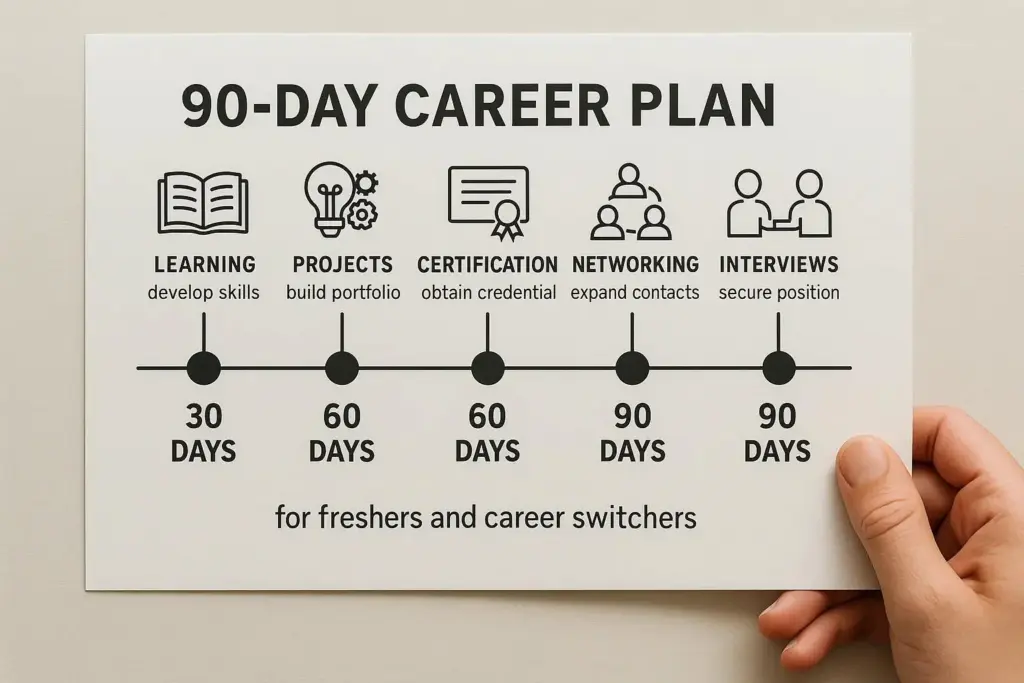
Table of Contents
What Skills Do Employers Look for in Remote IT Jobs?
Employers hiring remote IT professionals generally evaluate two areas: technical ability and remote working effectiveness. Technical skills determine whether you can perform the responsibilities of a specific role. A cloud engineer, for example, needs a different technical background from a cybersecurity analyst or software tester. Remote work skills determine how effectively you communicate, organize tasks, document progress, and collaborate with colleagues who may work in different locations or time zones. The World Economic Forum’s Future of Jobs Report 2025 identifies AI and big data, networks and cybersecurity, and technological literacy among the fastest-growing skill areas expected through 2030.
LinkedIn’s Skills on the Rise 2026 research also highlights AI-related capabilities alongside human skills such as cross-functional collaboration, leadership, and stakeholder communication. Together, these findings suggest that successful IT candidates need more than expertise in one technology. They must also demonstrate adaptability, independent judgment, and the ability to contribute to a team.
Essential Technical Skills for Remote IT Jobs in 2026
1. Artificial Intelligence and AI Literacy
Artificial intelligence has become an increasingly relevant part of technology work, extending beyond specialized machine learning positions. Software developers may use AI assistants to review code or explore solutions. IT support professionals can use approved AI tools to organize documentation, while data analysts may incorporate AI-assisted workflows into research and reporting. However, employers need people who understand both the capabilities and limitations of these tools. AI literacy includes writing useful instructions, verifying generated information, recognizing potential errors, and handling confidential data responsibly.
For specialized AI roles, technical requirements may include machine learning frameworks, model evaluation, data preparation, and integration with existing applications. If you’re new to AI, start by understanding how these tools can support your existing technical specialization rather than attempting to master every emerging platform.
2. Cloud Computing
Cloud computing remains a valuable skill for many remote technology careers because businesses rely on cloud-hosted applications, infrastructure, storage, and services.
Common platforms include Amazon Web Services (AWS), Microsoft Azure, and Google Cloud. Cloud engineers often work with infrastructure configuration, access controls, networking, monitoring, and cost management. Even professionals outside dedicated cloud engineering roles can benefit from understanding basic cloud concepts. Developers may need to deploy applications, while security analysts may review cloud permissions or investigate configuration risks. Beginners can start by learning how virtual machines, storage services, networking, and identity management work. Practical projects that demonstrate a working cloud deployment can help turn theoretical knowledge into evidence of technical ability.
3. Cybersecurity Fundamentals
Cybersecurity is relevant across nearly every IT specialization. Remote technology teams frequently access organizational systems through distributed networks, making secure authentication, permission management, and responsible data handling essential. Cybersecurity professionals may work with network security, vulnerability assessment, incident response, security monitoring, and risk management. For beginners, useful foundational subjects include phishing awareness, multi-factor authentication, secure passwords, network basics, and access control. More advanced candidates can develop expertise in security operations, cloud security, application security, or governance and compliance. The World Economic Forum identifies networks and cybersecurity as a major area of expected skills growth, reinforcing the value of security knowledge across technology careers.
4. Programming and Software Development
Programming remains fundamental to many IT positions, although the exact language depends on the role. Python is useful for automation, scripting, data analysis, and numerous backend workflows. JavaScript and TypeScript are commonly associated with web development, while SQL helps professionals work with relational databases. Rather than learning several programming languages superficially, focus on developing strong problem-solving skills in one relevant language. Employers may assess your ability to understand requirements, troubleshoot errors, test solutions, and write maintainable code.
For remote software development positions, familiarity with version control and collaborative development workflows is also important. A small but complete application can demonstrate more practical ability than a long list of technologies you’ve only studied briefly.
5. DevOps and Automation
DevOps skills connect software development with infrastructure, deployment, and operational reliability. Many technical teams use automated testing, continuous integration, continuous delivery, and infrastructure management to reduce repetitive manual work.
Familiarity with Git, CI/CD workflows, containers, and infrastructure automation can be useful for developers, cloud engineers, and platform specialists. You don’t need to become a dedicated DevOps engineer to benefit from automation knowledge. Understanding how software moves from development into production can help you collaborate more effectively with other technical teams. Start with a small project that demonstrates version control, automated testing, and a repeatable deployment process.
Important Remote Work Skills Beyond Technology
6. Clear Written Communication
Written communication is one of the most practical skills for remote IT jobs. In a distributed team, colleagues cannot always walk over to your desk to ask for clarification. Much of the information needed to complete work may be shared through messages, tickets, project updates, and documentation.
Good communication involves explaining technical problems clearly, asking specific questions, and sharing progress without unnecessary detail. For example, instead of writing “The system isn’t working,” a stronger update describes the affected service, the observed problem, what has already been tested, and what assistance is needed. This approach reduces confusion and helps coworkers respond efficiently. The value of communication also appears in LinkedIn’s 2026 skills research, which identifies several collaboration and stakeholder communication capabilities among growing skills categories.
7. Asynchronous Collaboration
Asynchronous collaboration means completing work and sharing information without requiring everyone to be available at the same moment. This matters when a remote team operates across different countries and time zones.
Employees need to document decisions, provide useful context, and communicate blockers so others can continue working independently. Tools such as Slack, Microsoft Teams, Jira, Notion, and GitHub may support these workflows, depending on the organization. However, knowing how to use a tool is not the same as collaborating effectively. An excellent remote teammate leaves clear task updates, explains decisions, and makes important information easy to find.
8. Time Management and Accountability
Remote professionals often have greater flexibility in organizing their working day, but this also requires dependable self-management. Employers value candidates who can prioritize tasks, estimate effort realistically, identify risks, and meet agreed deadlines. For IT positions, accountability also means communicating when work takes longer than expected. An employee who reports a blocker early is usually easier to collaborate with than someone who remains silent until a deadline passes. Building consistent planning habits can improve both productivity and trust.
9. Problem-Solving and Adaptability
Technology changes quickly, and remote professionals frequently encounter problems that don’t have an immediate answer. Strong problem-solving involves investigating the issue, considering possible causes, testing reasonable solutions, and documenting the outcome. Adaptability is equally important. A developer may need to learn a new framework, while a support technician may encounter an unfamiliar platform or security procedure. Employers benefit from people who can learn independently without assuming that every challenge requires a formal training program. This doesn’t mean knowing everything. It means approaching unfamiliar work with curiosity, structured reasoning, and a willingness to improve.
How to Prove Your Skills to Remote IT Employers
Listing technical skills on a résumé is useful, but practical evidence makes those claims more convincing. A software developer can demonstrate ability through completed applications, relevant GitHub repositories, and documented contributions. A cybersecurity candidate might present a sanitized lab report, a security assessment of an intentionally vulnerable practice environment, or a documented defensive project.
Cloud professionals can showcase infrastructure diagrams, deployment explanations, and examples of monitoring or access-control decisions. For remote positions, the quality of documentation is particularly valuable. A portfolio project that explains the problem, approach, outcome, and lessons learned can demonstrate both technical ability and written communication. Keep project descriptions concise and make sure hiring managers can understand your contribution without needing to examine every technical detail.
Which Skills Should Beginners Learn First?
The best starting point depends on your target career. If you’re interested in software development, begin with programming fundamentals, Git, debugging, and basic testing. For cloud computing, build foundational knowledge of networking, operating systems, access management, and one major cloud platform. If cybersecurity interests you, focus on networking, security fundamentals, operating systems, and practical investigation skills before moving toward advanced specializations.
For IT support roles, troubleshooting, customer communication, operating systems, and account administration are particularly relevant. Trying to learn AI engineering, cloud infrastructure, cybersecurity, and full-stack development simultaneously can slow your progress. Instead, choose one specialization, develop foundational skills, and add complementary capabilities gradually.
A Practical 90-Day Skill-Learning Roadmap
A structured learning plan can help turn broad career goals into manageable progress.
Days 1–30: Build Your Foundation
During the first month, identify the remote IT role you want and review relevant job descriptions.
Look for skills that appear repeatedly and separate essential requirements from optional qualifications.
Choose one primary learning area and establish a consistent study routine.
Your goal should be to understand fundamental concepts rather than collect as many certificates as possible.
Days 31–60: Apply Your Knowledge
During the second month, focus on practical work.
Build a small project connected to your chosen specialization.
For example, a developer might create a working web application, while an aspiring cloud engineer could document a secure test deployment.
Practice explaining what you built, the problems you encountered, and how you solved them.
Days 61–90: Build Proof and Prepare to Apply
During the final month, organize your work into a portfolio. Update your résumé and professional profile with relevant skills and specific project outcomes.
Practice technical interviews and prepare examples demonstrating communication, independent learning, and problem-solving. Begin applying to suitable remote positions, paying attention to location restrictions, experience requirements, and working-hour expectations. This roadmap is a practical starting structure, not a guarantee of employment within 90 days.
Common Mistakes When Preparing for Remote IT Careers
One common mistake is focusing entirely on technical knowledge while ignoring communication and documentation. A candidate may be technically capable but struggle to explain decisions or collaborate across time zones.
Another mistake is collecting certifications without applying the knowledge. Certifications can demonstrate structured learning, but they are more persuasive when combined with relevant projects or professional experience.
Some job seekers also apply to every remote role without checking whether the requirements match their background. A more focused approach involves choosing a realistic specialization and tailoring your application to the position.
Finally, remember that a job advertised as remote may still have country, region, or time-zone restrictions. Always review the location and eligibility requirements before applying.

Frequently Asked Questions
What are the most important skills for remote IT jobs in 2026?
Important skills include role-specific technical expertise, AI literacy, cloud and security fundamentals, clear communication, asynchronous collaboration, and independent problem-solving.
Can beginners get remote IT jobs without experience?
Yes, some entry-level opportunities exist, but competition and requirements vary. Relevant projects, internships, certifications, and demonstrable practical skills can strengthen an application.
Is AI knowledge necessary for remote IT jobs?
AI knowledge is increasingly useful, but it is not universally required. The appropriate level depends on the position and how the organization uses AI tools.
Which programming language should I learn for remote IT work?
Choose according to your target role. Python is useful for automation and data-related work, while JavaScript or TypeScript may be relevant for web development. Not all remote IT roles require programming.
Are cloud certifications worth getting?
Cloud certifications can demonstrate foundational or specialized knowledge. Their value depends on employer requirements, the credential, and whether you can apply what you’ve learned.
How can I demonstrate remote communication skills?
Use clear project documentation, well-written résumé descriptions, organized portfolio case studies, and interview examples that show effective teamwork and independent task management.
Do remote IT jobs allow applicants from any country?
Not always. Many remote positions restrict hiring to specific countries or regions because of employment arrangements, security requirements, or time-zone needs.
Final Thoughts
The most valuable skills for remote IT jobs in 2026 combine strong technical foundations with the ability to communicate clearly, work independently, and adapt to changing technologies. AI literacy, cloud computing, cybersecurity, programming, and automation are valuable areas to explore, but you don’t need to master all of them. Choose a specialization that matches your interests, build practical experience, and develop a portfolio that shows employers what you can accomplish. For your next step, explore Remote IT Jobs and compare the requirements of relevant positions with the skills you’re currently developing.